
Sprunky Characters
Meet 20 characters and learn the sound each one brings to a mix.
Beats
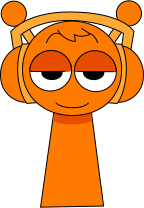
Oren
BeatsKick drum · Orange headphones
Oren is easy to spot by his orange color, headphones, and two antennae. His steady pulse gives a mix a clear rhythmic starting point.
Start with Oren, then add one effect and one melody before bringing in vocals.
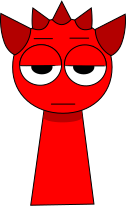
Raddy
BeatsSnare and hi-hat · Red horns
Raddy has a bright red body, pointed horns, and an intense expression. His beat feels forceful and helps energetic mixes move forward.
Pair Raddy with a calmer effect so the rhythm stays powerful without becoming crowded.
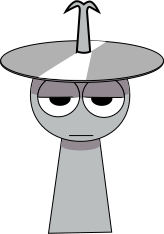
Clukr
BeatsRide cymbal · Silver cymbal
Clukr is the silver character with a cymbal-like top and mechanical details. His metallic percussion adds a crisp edge to the beat layer.
Use Clukr beside a rounder bass beat to create contrast between sharp and soft hits.
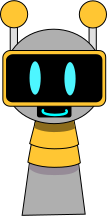
Fun Bot
BeatsElectronic drum loop · Robot visor
Fun Bot is a compact robot with an antenna and glowing visor. Its electronic rhythm gives mixes a clean, machine-like groove.
Combine Fun Bot with organic-sounding characters to balance digital precision with warmth.
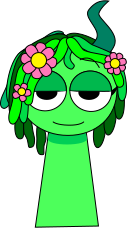
Vineria
BeatsMaracas and cabasa · Green vines
Vineria is recognized by green vines, curved horns, and a flower. Her rhythm has a natural texture that softens harder percussion.
Layer Vineria under a bright melody for an earthy groove with plenty of breathing room.
Effects
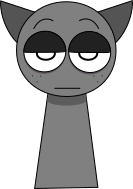
Gray
EffectsSynth bass · Gray cat ears
Gray has a muted gray palette, freckles, and pointed ears. His atmospheric effect adds depth without taking attention away from the main rhythm.
Use Gray early in a mix when you want space and ambience behind the lead sounds.
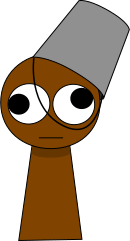
Brud
EffectsAgogo and cowbell · Brown bucket
Brud is the brown character wearing a simple metal bucket. His unusual effect brings a playful, weighty texture to a layered track.
Add Brud after the core beat and compare the mix with and without him to hear the extra weight.

Garnold
EffectsSynth and triangle · Gold armor
Garnold wears gold mechanical armor with a blue visor. His effect introduces a polished electronic color that works well in futuristic mixes.
Match Garnold with Fun Bot for a mechanical theme, then add one warm vocal for contrast.
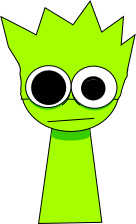
OWAKCX
EffectsCrash cymbal · Lime spikes
OWAKCX stands out through a lime color, spiky shape, and uneven eyes. The effect adds nervous motion and a less predictable texture.
Keep the surrounding arrangement simple so OWAKCX can provide movement without masking other parts.
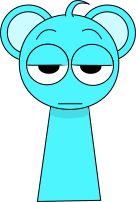
Sky
EffectsSoft ambience · Sky-blue ears
Sky is a soft blue character with rounded ears and a sleepy expression. His spacious effect makes a track feel lighter and more open.
Try Sky with a gentle melody and leave one slot empty to preserve the airy quality.
Melodies

Mr. Sun
MelodiesPiano · Golden sun
Mr. Sun is a smiling sun with a bright golden face. His clear melody lifts the mix and gives darker rhythms a warmer center.
Place Mr. Sun above a simple beat when you want the melody to stay easy to recognize.
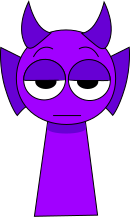
Durple
MelodiesTrumpet · Purple horns
Durple is the purple character with long horns and fin-like ears. His melody adds a mysterious color that suits slower or darker combinations.
Pair Durple with Gray for atmosphere, then use a restrained beat to keep the melody clear.
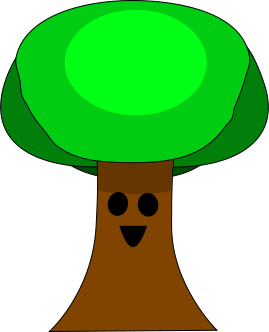
Mr. Tree
MelodiesOrgan · Leafy tree
Mr. Tree has a broad trunk, leafy crown, and friendly face. His melody feels grounded and adds an organic anchor to electronic layers.
Mix Mr. Tree with Vineria for a natural theme, then add a light vocal to finish the arrangement.
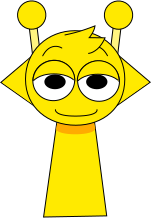
Simon
Melodies8-bit synth · Yellow antennae
Simon is bright yellow with two antennae and a wide, alert expression. His lively melody quickly becomes a memorable lead.
Give Simon room by using one main beat and one supporting effect instead of filling every slot.
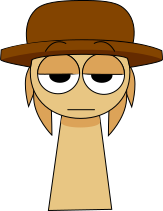
Tunner
MelodiesWhistle · Tan hat
Tunner is the tan character wearing a wide-brimmed hat. His measured melody adds a composed, slightly rustic tone to a mix.
Try Tunner with Clukr to contrast a relaxed melody against crisp metallic percussion.
Vocals
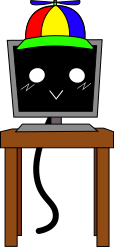
Mr. Fun Computer
VocalsDigital vocals · Desktop screen
Mr. Fun Computer is a desktop monitor with a propeller cap and expressive screen. Its digital voice makes an arrangement feel playful and synthetic.
Use Mr. Fun Computer as the main vocal when the rest of the mix already has an electronic theme.
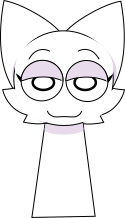
Wenda
VocalsHey vocal · White cat ears
Wenda is a white character with large pointed ears and a clean silhouette. Her vocal line adds a clear, expressive top layer to the track.
Place Wenda after the melody so you can judge whether the vocal supports or competes with the lead.
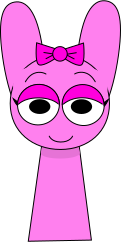
Pinki
VocalsChorus · Pink bow
Pinki is a pink character with long ears and a bow. Her warm vocal color can make a simple beat feel more melodic and friendly.
Combine Pinki with Oren for an accessible base, then add one effect to shape the atmosphere.
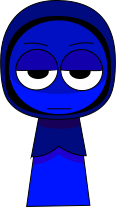
Jevin
VocalsDeep vocal · Blue hood
Jevin wears a deep blue hood and keeps a reserved expression. His darker vocal tone gives calm mixes a more dramatic finish.
Match Jevin with Durple or Gray, but keep the rhythm light so the low vocal texture remains distinct.
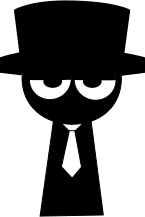
Black
VocalsLow vocal · Black silhouette (special non-canon design)
Black is a special non-canon design shown as a dark silhouette in a hat. The character is associated with a heavier, more ominous vocal presence.
Treat Black as a strong final layer and remove competing vocals before comparing the result.
Four roles build every mix
The core Sprunky cast is organized into Beats, Effects, Melodies, and Vocals. Beats establish tempo, Effects add texture, Melodies carry recognizable musical lines, and Vocals complete the arrangement with human or synthetic voices.
This guide focuses on details you can use while playing: how to recognize each character, the character's signature sound, and a practical way to combine that layer with the rest of a track.